Mastering Dynamic Visuals: A Practical Guide to the Energy Photoshop Action
In the evolving landscape of digital photography and graphic design, the demand for high-impact, visually striking imagery has never been greater. Photographers and designers often find themselves balancing the need for efficiency with the desire for unique, artistic flair. This is where specialized tools like the Energy Photoshop Action come into play. Designed to enhance images with vibrant, dynamic effects, this tool offers a streamlined approach to achieving complex visual styles that would otherwise require hours of manual editing. For professionals and enthusiasts alike, understanding how this action fits into a broader workflow is essential for making informed decisions about their creative toolkit.
Understanding the Core Functionality
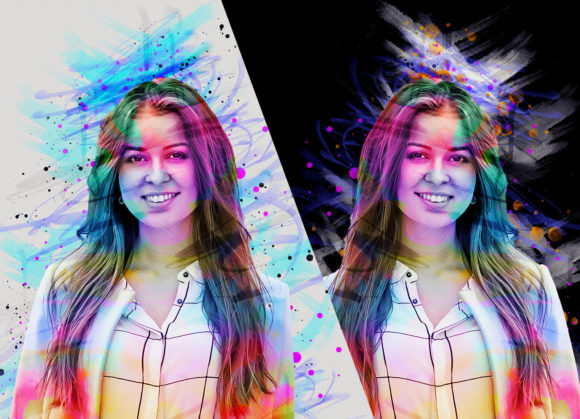
The Energy Photoshop Action is essentially a automated script within Adobe Photoshop that applies a series of predefined adjustments, filters, and layer effects to an image. Its primary purpose is to inject a sense of movement, vitality, and color depth into static photographs. Unlike standard presets that merely adjust exposure or contrast, this action focuses on creating a "stunning" aesthetic by manipulating light, color gradients, and texture. The result is an image that appears more alive, often characterized by glowing highlights, intensified shadows, and a distinct atmospheric quality.
One of the standout features of this specific action set is its versatility. It includes 10 different color options, allowing users to tailor the mood of the image to match their creative vision. Whether the goal is a warm, sunset-inspired glow or a cool, electric blue tone, the variety ensures that the effect does not feel repetitive or one-size-fits-all. This level of customization is crucial for designers who need to maintain brand consistency or photographers who wish to develop a signature style without sacrificing individuality.
Workflow Integration and Technical Requirements
Before integrating any new tool into a professional workflow, it is vital to assess compatibility and technical prerequisites. The Energy Photoshop Action has been tested and verified to work seamlessly with a wide range of Adobe Photoshop versions, including CS6, CC2015.5, CC2016, CC2017, CC2018, CC2019, and CC2020 (English Version). This broad compatibility is a significant advantage, as it allows users with older software licenses to still access modern editing techniques without needing to upgrade their entire suite.
However, achieving the best results requires adherence to specific preparation steps. The action is not a "one-click" solution in the traditional sense; it demands a structured approach to image preparation. For instance, users are instructed to expand the space around their photo before applying the action. This involves using the crop tool to increase the canvas size, typically resizing the image to dimensions such as 2000px by 2000px at 72 resolution. This step is critical because the action relies on having sufficient negative space to generate its effects properly. Without this expansion, the final output may appear cramped or distorted, undermining the intended aesthetic.
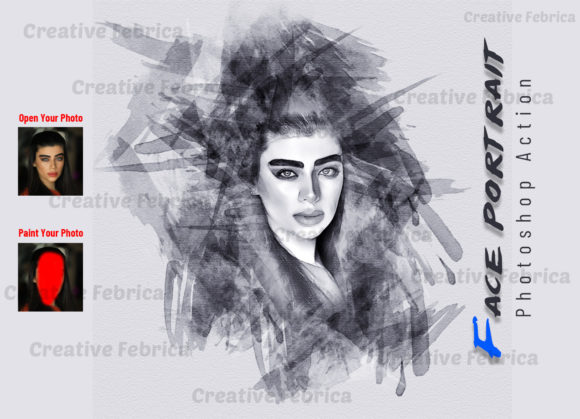
Additionally, the process involves creating a new layer named "paint" in lowercase. Users must select a brush and paint over specific areas of the image where they want the energy effect to be most prominent. This manual input adds a layer of control, ensuring that the automation serves the artist’s intent rather than overriding it. Once the painting is complete and the layer visibility is toggled off, the action can be played. This hybrid approach—combining manual guidance with automated execution—strikes a balance between speed and precision.
Comparing Automated Actions vs. Manual Editing
When evaluating the Energy Photoshop Action, it is helpful to compare it against traditional manual editing methods. Manual editing offers unparalleled control, allowing designers to tweak every pixel, adjust individual curves, and craft bespoke lighting effects. However, this level of detail comes at the cost of time. Creating a complex energy effect from scratch can take anywhere from thirty minutes to several hours, depending on the designer’s skill level and the complexity of the image.
In contrast, the action reduces this timeframe to mere minutes. For professionals working under tight deadlines, such as those in social media marketing, event photography, or commercial advertising, this efficiency is invaluable. The trade-off, however, is a degree of uniformity. While the 10 color options provide variety, the underlying structure of the effect remains consistent. Therefore, this tool is best suited for projects where speed and consistency are prioritized over absolute uniqueness. It is an excellent choice for batch processing or for creating a cohesive look across a series of images, but it may not be ideal for high-end fine art projects where every detail must be meticulously crafted by hand.
Ideal Use Cases and Limitations
Identifying the right context for using the Energy Photoshop Action is key to maximizing its value. It excels in scenarios where the goal is to grab attention quickly. For example, concert posters, sports photography, and futuristic concept art benefit greatly from the heightened sense of motion and vibrancy that the action provides. The glowing effects and enhanced colors can make subjects pop against busy backgrounds, drawing the viewer’s eye immediately to the focal point.
However, there are limitations to consider. The action works best on images with clear subjects and defined lighting. Photos that are overly dark, blurry, or lack contrast may not respond well to the effect, resulting in a muddy or unnatural appearance. Furthermore, the requirement to expand the canvas means that the final image dimensions may need to be cropped back down, which could potentially cut off important elements if not planned carefully. Users must also be comfortable with basic Photoshop functions, such as layer management and brush tools, to prepare the image correctly. Those who are completely new to the software may find the preparation steps slightly daunting, although the included PDF help file and instructions are designed to mitigate this learning curve.
Evaluating Value and Alternatives
When considering whether to invest in the Energy Photoshop Action, it is important to weigh it against other available resources. There are numerous other actions, plugins, and presets on the market, each offering different styles and levels of complexity. Some alternatives may offer more advanced customization options, while others might be simpler but less versatile. The decision ultimately depends on the user’s specific needs. If the goal is to achieve a specific "energy" look quickly and reliably, this action set is a strong contender. Its inclusion of brushes, multiple color options, and comprehensive help files adds significant value, making it a complete package rather than just a single script.
For those who prefer a more hands-on approach or require total creative freedom, learning to create these effects manually may be a better long-term investment. Online tutorials and courses can teach the underlying principles of lighting and color theory, providing skills that are applicable to a wider range of projects. However, for those who need immediate results and consistent quality, the convenience of a pre-built action is hard to beat. It serves as a powerful tool in a designer’s arsenal, complementing rather than replacing fundamental skills.
Making an Informed Decision
Ultimately, the Energy Photoshop Action represents a practical solution for enhancing digital images with minimal effort. Its ability to transform ordinary photos into stunning, dynamic visuals makes it a valuable asset for photographers and designers looking to elevate their work. By understanding its technical requirements, comparing it to manual methods, and recognizing its ideal use cases, users can determine whether it aligns with their creative goals. Whether used for commercial projects, personal art, or social media content, this tool offers a efficient pathway to achieving professional-quality results. As with any creative resource, the key lies in using it thoughtfully, ensuring that it enhances the narrative of the image rather than distracting from it.