Unicorn Sublimation & Sticker Design Guide
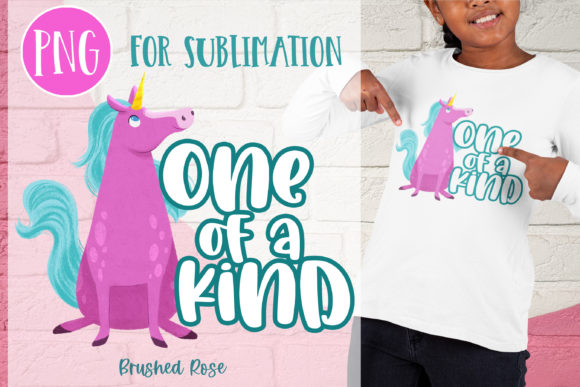
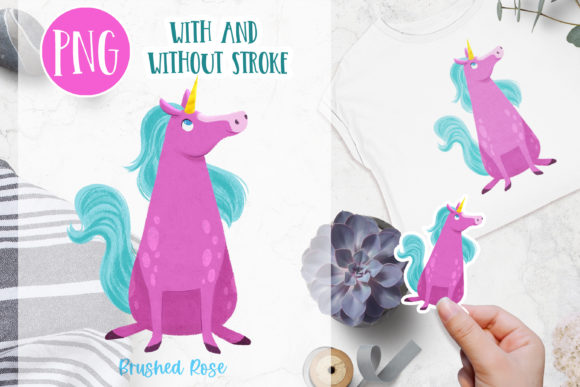
Celebrating creativity often begins with a single, vibrant image that captures the imagination. For National Unicorn Day, I illustrated a sweet little unicorn designed specifically to bring joy and color to various DIY projects. This Unicorn PNG Pink and Blue Unicorn Sublimation or sticker asset is more than just a cute graphic; it is a versatile tool for makers, small business owners, and hobbyists looking to add a magical touch to their products. The bright colors are engineered to pop on any product, ensuring your creations stand out in a crowded market or on a personal gift.
Understanding how to utilize digital assets effectively can transform a simple idea into a professional-quality item. Whether you are new to crafting or an experienced entrepreneur, knowing the technical details of your design files is crucial for achieving the best results. This guide explores the practical applications of this specific unicorn illustration, helping you decide which version fits your project needs.
Understanding the Two Versions
One of the most valuable aspects of this digital download is the inclusion of two distinct versions of the same artwork. This flexibility addresses the different technical requirements of sublimation printing versus vinyl cutting or sticker making. Here is what you need to know about each file:
- Version 1 (No Stroke): This file is optimized for sublimation. It features no outer border or stroke, allowing the colorful design to blend seamlessly onto fabrics, mugs, and hard surfaces. At 300 DPI and approximately 11.5 inches tall, it provides high-resolution detail suitable for larger prints where clarity is paramount.
- Version 2 (With Stroke): This version includes a clean white stroke around the unicorn, making it perfect for creating die-cut stickers. At 300 DPI and about 5 inches tall, this size is ideal for standard sticker sheets, laptop decals, and water bottle labels. The stroke ensures the design remains visible and distinct when cut from vinyl or printed on sticker paper.
Having both options in one package saves time and eliminates the need for external editing software to add borders or resize images manually. It allows creators to switch between projects quickly, maximizing the utility of a single purchase.
Why Choose This Unicorn Design?
The appeal of a Unicorn Sublimation or Sticker design lies in its universal charm and aesthetic versatility. Unicorns symbolize magic, innocence, and wonder, making them a perennial favorite across various demographics. This particular illustration uses a pink and blue color palette, which is not only trendy but also gender-neutral enough to appeal to a broad audience. The bright hues are selected to ensure high visibility and impact, whether printed on a dark mug or a light t-shirt.
For small business owners, offering products with high-quality, eye-catching graphics is essential for brand differentiation. A well-executed unicorn design can attract customers looking for unique gifts, party favors, or personal accessories. For educators and parents, these designs can be used to create engaging classroom materials, reward charts, or personalized school supplies that make learning fun.
Practical Applications and Use Cases
The versatility of this digital asset means it can be applied to a wide range of products and contexts. Here are several realistic ways to use this Unicorn PNG Pink and Blue Unicorn Sublimation or sticker illustration:
Sublimation Projects
Sublimation printing allows ink to become part of the material, resulting in durable, vibrant images that do not crack or peel. The no-stroke version of this unicorn is ideal for:
- Apparel: Print on polyester-blend t-shirts, tote bags, or aprons for a soft, breathable finish.
- Home Decor: Create custom pillows, coasters, or mouse pads that add a whimsical touch to any room.
- Drinkware: Sublimate onto ceramic mugs or tumblers for a lasting, dishwasher-safe design.
Sticker and Vinyl Crafts
The version with the stroke is tailored for cutting machines and sticker printers. Consider using it for:
- Planner Accessories: Add a touch of magic to daily planners and journals.
- Laptop and Water Bottle Decals: The durable nature of vinyl stickers makes them perfect for personalizing everyday items.
- Party Favors: Create custom stickers for birthday parties, baby showers, or unicorn-themed events.
Important Considerations for Best Results
To ensure your final product matches your expectations, there are a few technical factors to keep in mind. First, remember that colors may differ from monitor to monitor. Digital screens display colors using light (RGB), while printers use ink (CMYK or sublimation dyes). It is always advisable to print a test sheet to check color accuracy before producing a large batch. Adjusting your printer settings and using high-quality substrates can help minimize discrepancies.
Secondly, pay attention to the resolution. Both files are provided at 300 DPI (dots per inch), which is the industry standard for high-quality printing. Avoid resizing the images significantly beyond their original dimensions, as this can lead to pixelation and loss of detail. The 11.5-inch height for the sublimation version is generous, allowing for large-scale prints, while the 5-inch sticker version is optimized for standard cutting mats and printer beds.
Finally, consider the material you are printing on. Sublimation works best on white or light-colored polyester fabrics and polymer-coated hard goods. For stickers, choose weather-resistant vinyl if the item will be exposed to the elements, such as on a car window or outdoor water bottle.
Getting Started with Your Project
Starting a new craft project can feel overwhelming, but with the right tools and resources, it becomes an enjoyable and rewarding experience. Begin by selecting the appropriate file version for your intended product. If you are making a t-shirt, choose the no-stroke PNG. If you are creating a set of planner stickers, select the version with the stroke.
Next, prepare your workspace. Ensure your heat press or printer is calibrated correctly. For sublimation, use protective paper to prevent ink bleed and ensure even heat distribution. For stickers, calibrate your cutting machine to match the thickness of your vinyl or sticker paper. Take your time during the weeding process for vinyl cuts to preserve the intricate details of the unicorn’s mane and tail.
By understanding the nuances of Unicorn Sublimation or Sticker designs, you can create professional-quality items that delight customers and friends alike. This sweet little unicorn illustration is a testament to the power of thoughtful design, offering both aesthetic appeal and practical functionality for a wide range of creative endeavors.